From Framer to a free custom site on Render: what I learned with Git, Cursor, and Aikido
A beginner-friendly walkthrough of moving a personal Framer site to Astro on GitHub and Render, with Aikido findings from the Framer-hosted domain first, and a Render re-scan planned as step two.
Framer
Git
GitHub
Cursor
Astro
Starwind
Render
Aikido
This blog is for people who have a personal website on Framer (or a similar builder) and want to move it to a custom site they can host for free. I am not a developer by training. I work in Customer Success. I rebuilt krsnq.com so I could understand the path end to end: files on my computer, history in Git, backup on GitHub, hosting on Render, and security checks in Aikido.
If you can follow a setup wizard and are willing to ask questions when something breaks, you can follow this.
Where this project is right now: the custom site is built, on GitHub, and deployed on Render. I am in the middle of moving krsnq.com from Framer hosting to that Render site. That timing matters for the security section below.
What “custom” means in plain language
On Framer, the product owns a lot of the invisible parts. You design pages. Framer hosts them.
On a custom static site, you own more of the chain:
- Project folder on your computer (the files)
- Git (a history of saves, so you can go back)
- GitHub (an online copy of that history)
- Build (a command that turns source files into ordinary HTML/CSS/JS)
- Host (a service that puts those files on the internet)
- Security checks (tools that look for risky settings, secrets, and dependency problems)
I used Astro for the site, Starwind UI for components, GitHub for the repo, Render for free static hosting, Cursor as the editor with AI help, and Aikido for security monitoring.
Why leave Framer at all?
Framer is excellent for design speed. I left it for three reasons.
First, I wanted to see the files. Second, I wanted a workflow that looks like the tools my customers use. Third, I wanted security findings attached to a real project I own, not only to a polished page I cannot inspect.
That does not mean Framer is “bad.” It means Framer and a custom stack teach different things.
The beginner path I followed
1. Install the basics on your Mac
You need:
- Node.js (so your computer can run modern web tools)
- Git (for version history)
- A free GitHub account
- A free Render account
- Optionally Cursor, if you want AI help while you learn
On my Mac, Git was already there. Node was not, so I installed it. If node -v works in Terminal and shows version 18 or higher, you are fine for this path.
2. Create the project and put it on GitHub
I started from an empty folder, turned it into a Git project, made a first save (a “commit”), and pushed it to GitHub under github.com/krsnq/krsnq.com.
Simple meanings:
- Commit = snapshot of the project with a short message
- Push = send those snapshots to GitHub
- main = the main branch, the default line of history
If you have never used Git, treat this like “Save As” with a timeline, not like magic.
3. Rebuild the pages in Astro
I copied the content from my Framer site (home, now, about, timeline, contact) into Astro pages. Astro fitted a personal site well because it produces a static site: pages that are already built before visitors arrive. That is cheaper and simpler to host than a full app server.
Starwind gave me ready UI pieces (buttons, theme toggle, separators) without forcing React into the project.
4. Deploy for free on Render as a Static Site
On Render I created a Static Site connected to the GitHub repo.
Settings that worked for me:
- Branch:
main - Build command:
npm install && npm run build - Publish directory:
dist - Node version: 22.x (because the project asks for a recent Node)
Render’s free static hosting is enough for a personal site. When I push to main, Render rebuilds and updates the public URL.
For a while you will usually have two internet faces:
- the Framer-hosted site still answering on your custom domain
- the Render-hosted site on a Render URL (something like
your-site.onrender.com)
I am now moving krsnq.com onto Render. Until that domain cutover finishes, a scan of https://krsnq.com is still a scan of Framer. That is expected. It is also easy to misread if you skip this detail.
5. Connect Aikido so security is part of the workflow
I connected Aikido in two ways that matter for beginners:
- Aikido in the browser linked to the GitHub repo and the domain
- Aikido MCP in Cursor, so I can talk to Aikido from the same place I edit the site
The Cursor sign-in screen is simple once it works:
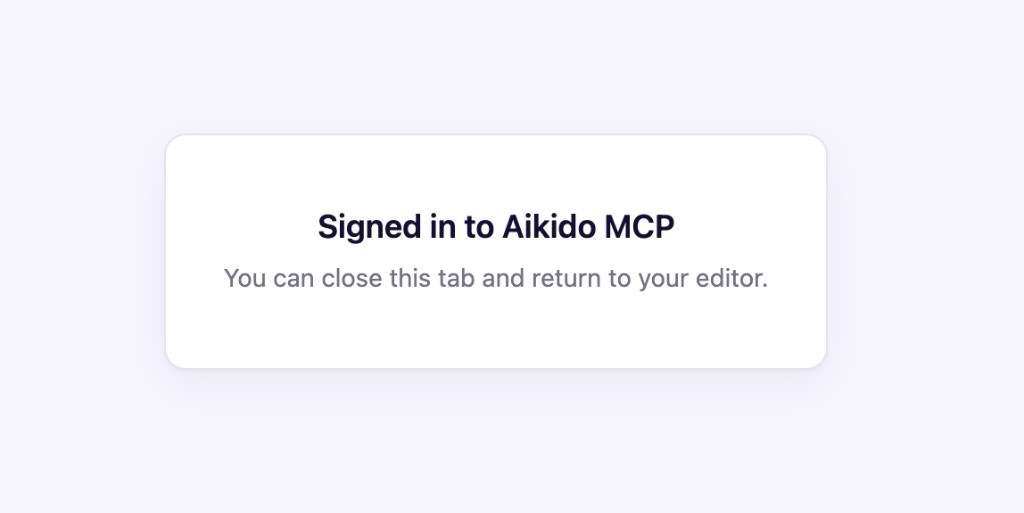
One practical tip from my own setup: Aikido’s Cursor connection needs Node available on your machine. If Cursor cannot find Node, the Aikido plugin looks “broken” even when your Aikido account is fine. Pointing Cursor’s MCP config at your Node install fixed that for me.
What Aikido showed me so far
I am reading Aikido in two phases on purpose.
Phase 1 (this blog): findings from the GitHub repo, plus domain findings from the site while it was still hosted on Framer.
Phase 2 (next update): after krsnq.com fully points at Render, I will re-scan the live domain and add the Render-hosted findings here. Those may look different, especially the header-related issues.
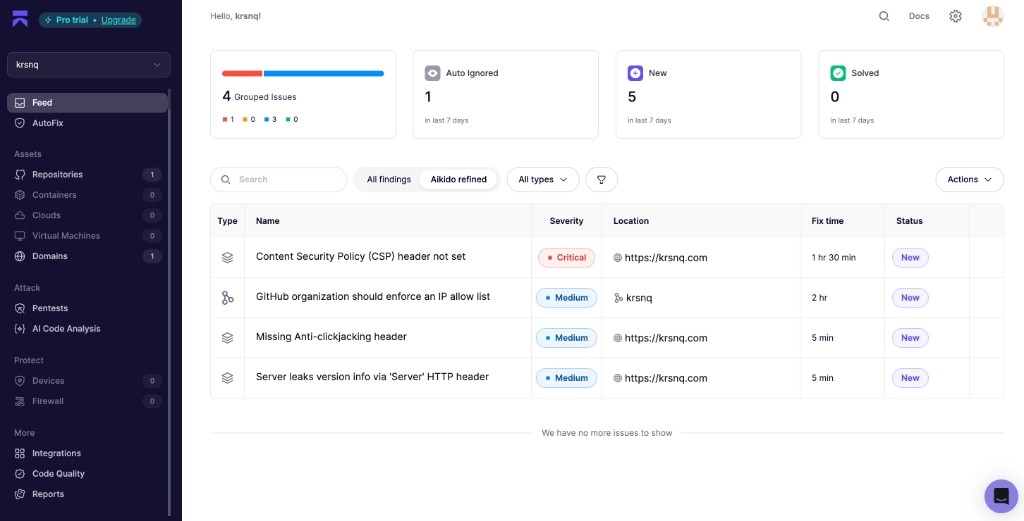
After the repo and domain were in Aikido, the feed was not empty. That was the point. Here is the overview I saw during Phase 1:
Repository checks: the good news first
These checks are about the GitHub project itself. They are already relevant to the Render build, because Render builds from that same repo.
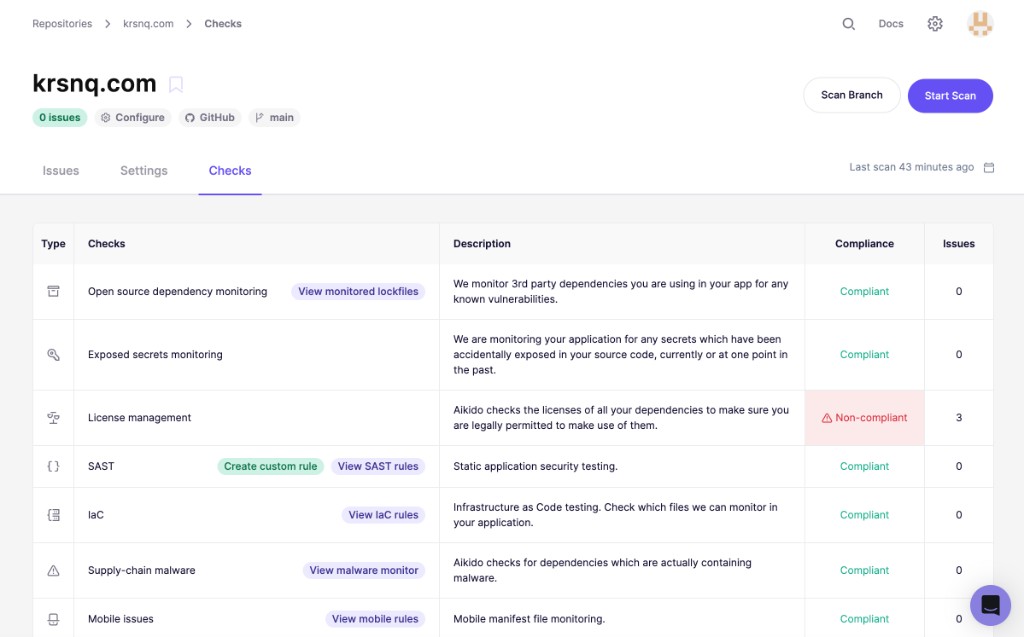
In plain language:
- Open source dependency monitoring: 0 vulnerability issues
- Exposed secrets monitoring: 0 issues
- SAST (code pattern checks): 0 issues
- License management: marked non-compliant, with 3 license findings
So the rebuild did not leave obvious secrets in the repo, and dependency vulnerabilities were not the first fire to put out. That is a useful baseline when you are learning. It does not mean “perfectly secure.” It means the first scan did not find the scary beginner mistakes (passwords in files, known vulnerable packages screaming red).
License findings: packages are not only “code,” they are legal terms
Aikido’s license view for the repo showed packages with different risk labels. Some image-processing packages were flagged High because of dual Apache and LGPL license terms. Many Astro packages were Low (MIT).
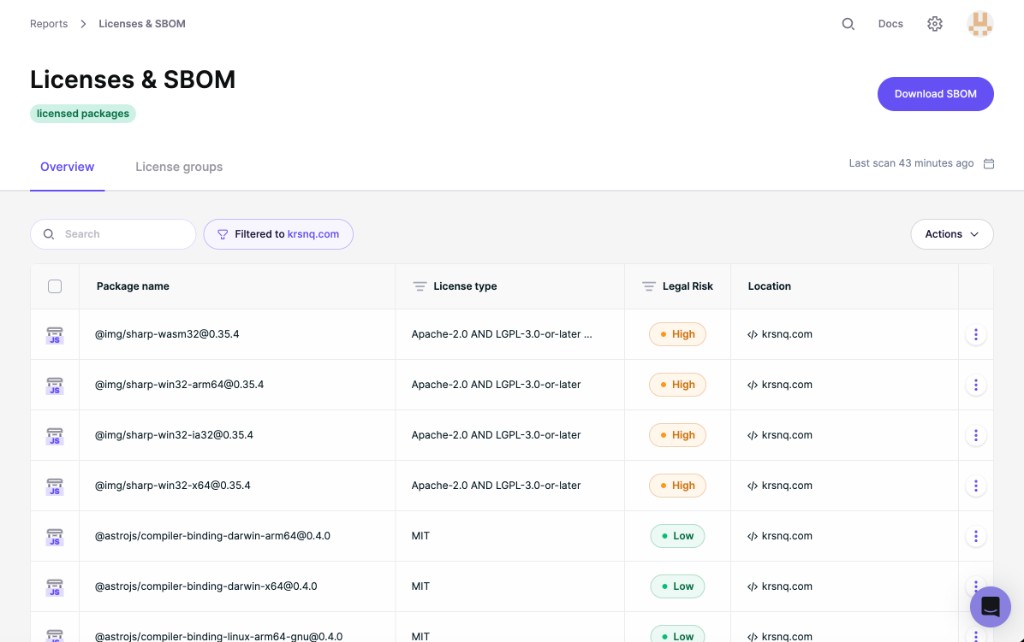
For a personal site, this is less dramatic than a leaked password, but it is still a real lesson. Modern sites are assemblies of other people’s packages. Security tooling does not only ask “can someone hack this?” It also asks “are you allowed to use these pieces the way you are using them?”
Domain findings from Framer (Phase 1 only)
Aikido also scanned the public domain https://krsnq.com. That is different from scanning the GitHub repo. The domain scan looks at what a visitor’s browser can observe from the live site.
Important: at the time of these screenshots, krsnq.com was still being served by Framer. The evidence in Aikido even showed a Framer server signature. So treat every finding in this subsection as a Framer-hosted baseline, not as the final picture of the Render site.
I am moving the domain to Render now. Phase 2 will be a fresh domain scan after that cutover. I will update this blog with those Render findings instead of pretending the Framer results already describe the new host.
Critical: Content Security Policy header missing (on Framer)
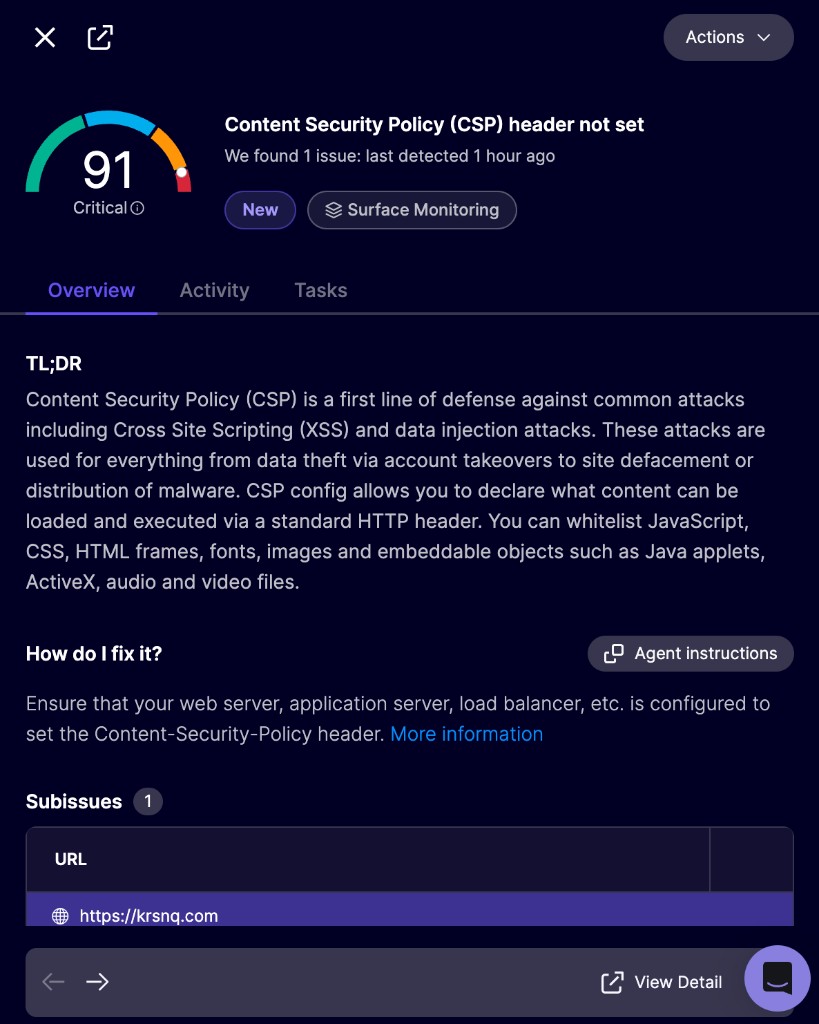
A Content Security Policy (CSP) tells browsers which scripts, styles, and other content are allowed. Without it, certain classes of attacks (like some cross-site scripting paths) have an easier time. Aikido marked this Critical on the Framer-hosted domain.
For a beginner, the takeaway is that hosting is not only “files online.” Headers are part of the product. After the domain moves to Render, I will check this again and configure headers on the Render static site if they are still missing.
Medium: Server header leaks version info (Framer evidence)
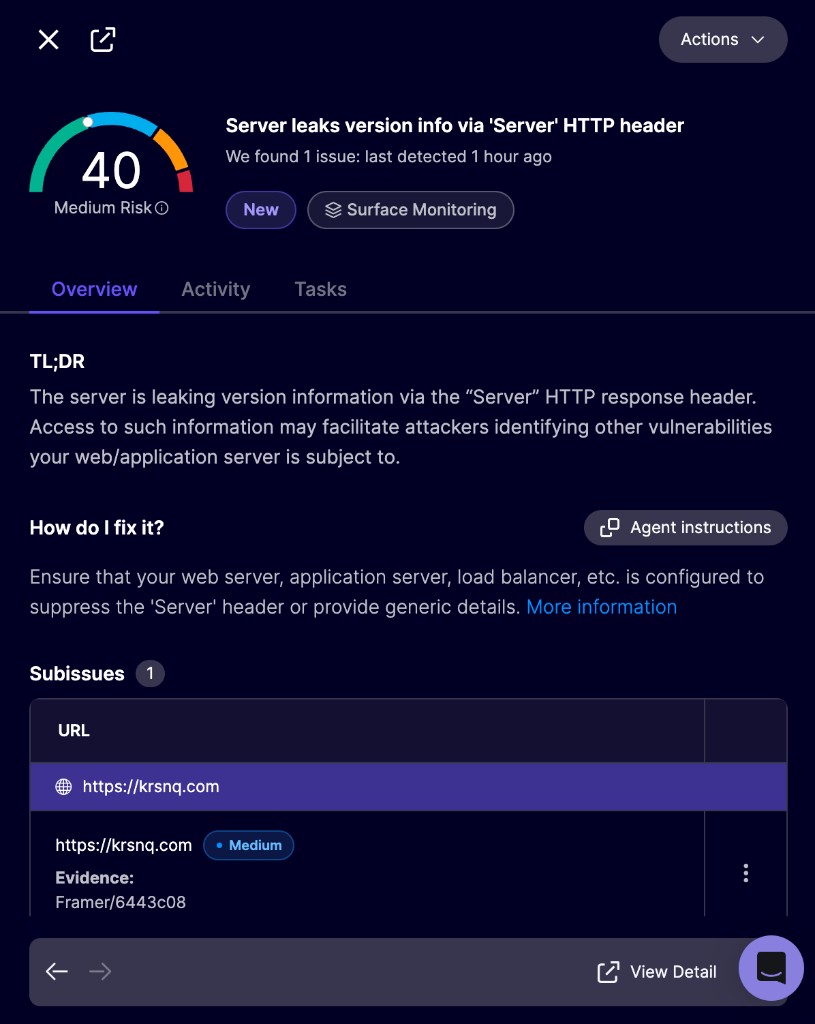
This finding said the Server header exposed version-like information. The evidence was Framer/6443c08 on https://krsnq.com.
That is the clearest proof that Phase 1 scanned Framer. It is also a useful Customer Success lesson: “we deployed on Render” and “the custom domain serves Render” are not the same moment. Until DNS moves, the public domain can still tell a different story.
Medium: Missing anti-clickjacking header (on Framer)
Also in the Framer-era feed: a missing anti-clickjacking header (usually related to X-Frame-Options or frame ancestors in CSP). Same family of issue as CSP: response headers that protect how the site can be embedded and abused. This will be re-checked in Phase 2 on Render.
Medium: GitHub organization IP allow list
Aikido also reported that the GitHub organization should enforce an IP allow list. The remediation text points to GitHub Enterprise Cloud features. For a small personal setup this may not be something you can turn on in the same way a large company can. Still, reading the finding is useful. It teaches the category: reduce who can even reach your source control.
Phase 2: Render domain findings (coming next)
Once krsnq.com fully points at the Render-hosted site, I will:
- Confirm the live site is no longer answering as Framer
- Re-run Aikido surface monitoring on the domain
- Compare what changed after the host move
- Add those Render findings to this blog as an update
I expect some header findings may still appear, because a static site on Render does not magically invent CSP for you. I also expect the Framer server signature to disappear. Writing that comparison publicly is part of the learning.
How I would explain this to a future customer
If I translate this project into Customer Success language, the story is not “I became a security engineer.” The story is:
- I can follow a delivery path from local files to production
- I can tell the difference between repo findings and live-site findings
- I can tell the difference between “old host still on the domain” and “new host live on the domain”
- I can read a severity label and ask a better next question
- I can admit what is still open (domain cutover, Render re-scan, headers, license review)
That is the fluency I want when a customer says “we scanned and now we have criticals.” Critical does not always mean “the product is on fire right now.” Sometimes it means “a control is missing on the current host.” Knowing the difference helps you coach without panic and without false comfort.
A simple checklist if you want to do the same
- Export or copy your Framer content (text, images, page list).
- Create a GitHub account and a new repository.
- Build a static site locally (Astro is one good option for personal sites).
- Push to GitHub.
- Create a Render Static Site from that repo (
npm install && npm run build, publishdist). - Confirm the Render URL works.
- Add the repo in Aikido and read the repo findings.
- If you also scan your custom domain while it still points at Framer, label those results clearly as Framer baseline.
- Move DNS for your custom domain to Render.
- Re-scan the domain after cutover and treat that as Phase 2 / Render findings.
What I am still working on
I am publishing this while the cutover is still in progress, so I can update it with Phase 2 findings. Next concrete steps for me:
- Finish moving
krsnq.comfrom Framer to the Render-hosted site - Re-scan the domain in Aikido and publish Phase 2 findings here
- Add security headers on Render if the new scan still asks for them
- Decide what to do about license findings that are noisy versus findings that are real decisions
If you are also moving off a website builder, I hope this makes the path less mysterious. You do not need to know everything before you start. You need a clear sequence, honest tooling, and the patience to read the first red and orange labels without either ignoring them or freezing.